
The digest: your period, told without you writing it.
Every so often — a day, a week, six months — the digest gathers what happened and tells it: what moved in each project, what got decided, who unblocked what and what is still open. It is not a metrics dashboard and not an activity log: it is written prose you read in five minutes, drawn from material already in your workspace, and it can reach you by email at the hour you choose without you asking for it.
What it is, and what it is not
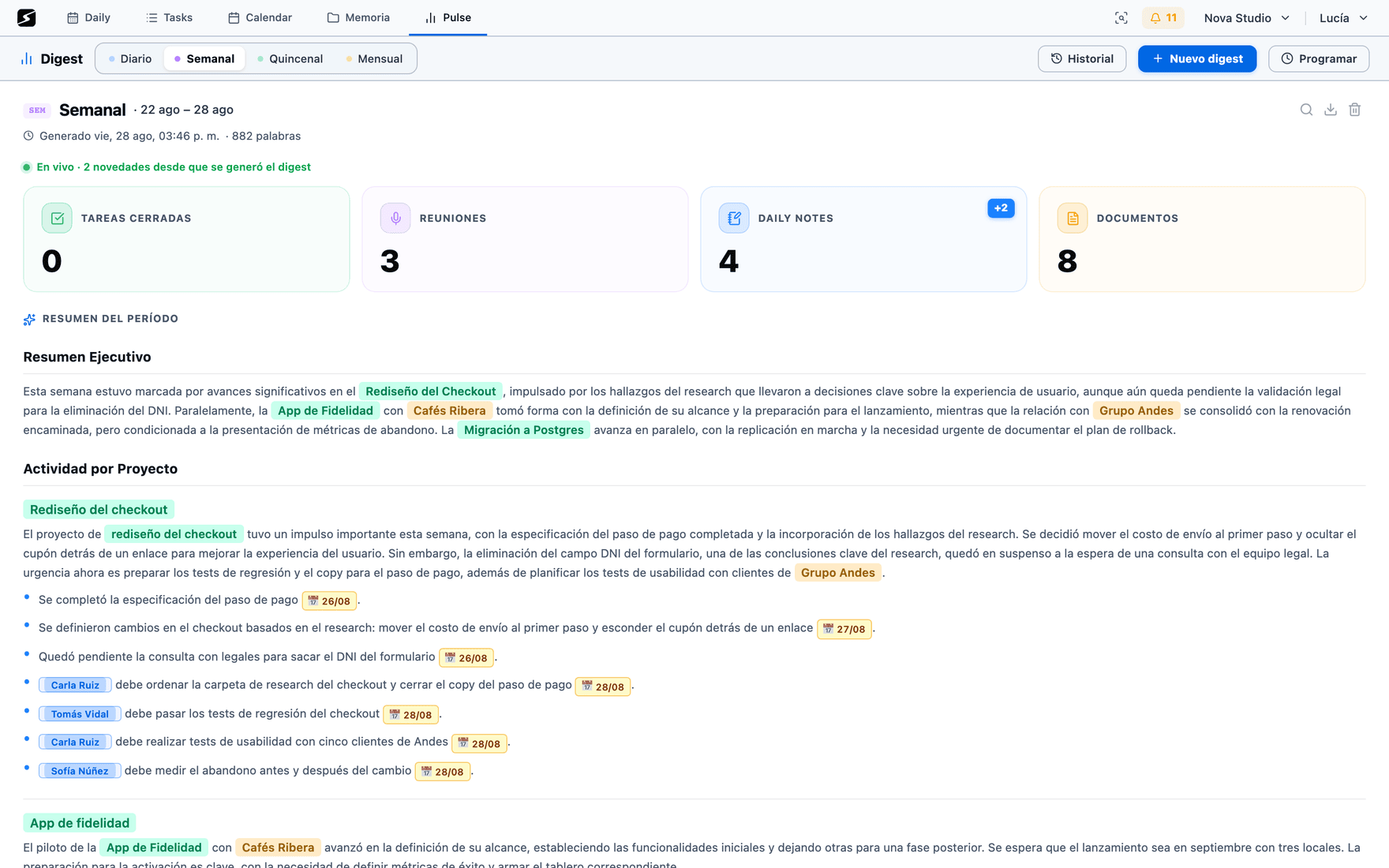
It lives in the Pulse tab, under Digest. You pick the period, hit generate, and in under a minute the text is there.
What sets it apart from any automatic summary is where the material comes from: it does not read "your activity", it reads your content. The notes you wrote, the recaps of your meetings, the tasks you closed and the documents you touched — all of it with its Atlas labels already attached, so it can group by project and by client instead of by day.
The rule that shapes the text
A digest synthesises, it does not enumerate. Ten syncs about the same thing are one sentence, not ten bullets. The narration tells the story and the bullets carry the hard facts — decisions, deliverables, dates. And each fact appears once, in the project that represents it best.
Whatever has no data is left out: if there were no meetings, there is no empty meetings section. Nothing gets padded with "TBD".
The periods
There are seven fixed periods and a custom range. The long ones are rolling windows — the last 90, 180 or 365 days — not the calendar quarter or half-year: a six-month digest requested on August 20 starts on February 22, not on July 1.
| Period | What it covers |
|---|---|
| Daily | The whole previous day. It excludes today: the email arrives in the morning and today's meetings have not happened yet. |
| Weekly | The current week, Monday through today. |
| Biweekly | This week and the one before. |
| Monthly | The last 30 days. |
| Quarterly | The last 90 days. |
| Six-month | The last 180 days. |
| Annual | The last 365 days. |
| Custom | Whatever date range you pick. |
Each period keeps its own history: weekly digests do not mix with monthly ones, and regenerating one for the same day and the same type overwrites the previous one instead of piling up copies.
What it is built from
Everything that goes into the digest comes from the requested period, and from nowhere else:
The daily notes
The text exactly as you wrote it, in chronological order. Grouped by month in a long period.
The recaps
With their summary, their entities, the document they live in and the calendar event they correspond to.
Meetings with no recap
The ones that happened and left no recording, with their attendees. For a digest that is information, not filler.
The tasks
Closed, new, and the ones carried over or overdue. Cancelled ones never make it in.
The deliverables
The grouping you already saw in the app, so progress is told per deliverable instead of task by task.
The documents
The ones modified during the period, with their labels, so they are counted inside the project they belong to.
Out of that comes a text that — from a weekly upwards — takes this shape: Executive summary, Activity by project (the main section, narration plus supporting bullets), Other only if something genuinely fits nowhere, Key people when someone crossed several projects, and Next actions. The daily one is shorter: what happened, work done, tasks completed and what is urgent today.
What changes in a six-month digest
A half-year is not a week with more data: it is a different text. A reader does not want the detail of every meeting from four months ago, they want the shape of the period. So long periods change three things.
- 1More material comes in, with less detail eachA weekly looks at up to 30 notes and 20 meetings with plenty of text from each; a six-month one looks at up to 300 notes and 300 meetings, with less text per item. The other way round does not work: half a year at weekly detail fits nowhere, and trimming by count makes the report talk only about the last few weeks.
- 2Everything goes in chronologically, grouped by monthNotes come in oldest to newest, with a header per month, and the model is also told how much activity each month had. Without that, the old months end up buried in the middle and the report opens talking about July when the period starts in February.
- 3Sections appear that a weekly does not haveA month-by-month timeline, milestones and results, improvement opportunities and conclusions. And the maximums go up: in a long period one project can take ten bullets and the report can run several pages.
| Extra section | Where it shows up |
|---|---|
| Milestones of the month | Monthly. The 3 to 6 advances that defined the month, with dates. Something important that got stuck is a milestone too. |
| Timeline | Quarterly, six-month and annual. One paragraph per month, chained to the previous one, with a line for every month in the period: skipping a month that has material is not allowed. |
| Milestones and results | Quarterly, six-month and annual. The big wins with their impact — and what was attempted and left halfway. |
| Improvement opportunities | Monthly and up. Patterns with the evidence from the period behind them. If the data shows none, the whole section is dropped. |
| Conclusions | Quarterly, six-month and annual. Where real progress happened, what stayed open, and what you walk into the next period with. |
How you shape it
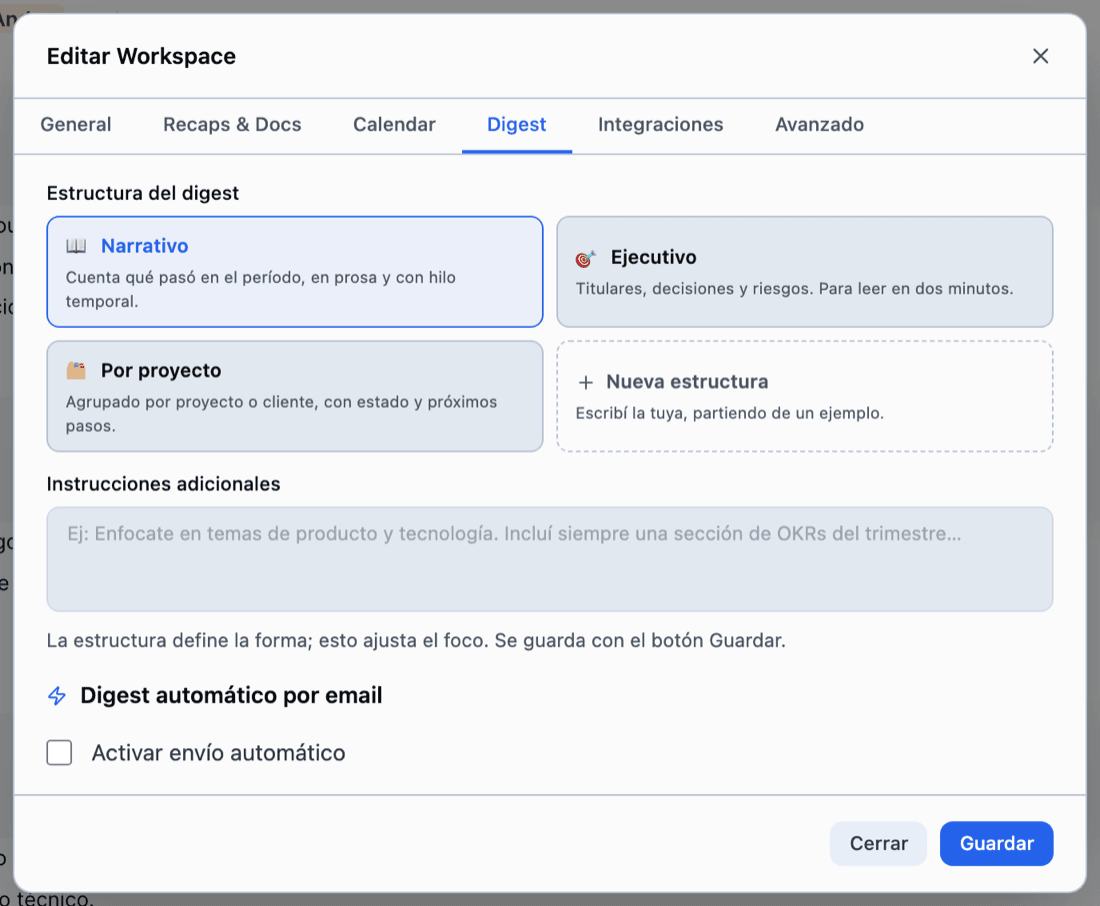
The shape of the digest is chosen once, in the Digest tab of the workspace settings, and applies to every digest generated afterwards.
- Narrative — tells what happened with a temporal thread, in prose. This is the default.
- Executive — headlines, decisions and risks. To be read in two minutes.
- By project — grouped by project or client, with status and next steps for each.
- Yours — up to two structures of your own, written with whatever headings and sections you want. They start from an editable example, not from a blank page.
Next to it there is an extra instructions field: free text that shifts the focus without changing the structure ("always talk money in dollars", "data team first", "do not name clients"). The structure rules the format; the instructions rule the emphasis.
Your profile goes in too: the name and description on your account are used as context for who the reader is. See Settings.
The automatic email · Pro
The digest can arrive on its own, without you opening the app. You turn it on in the same tab and configure it at two levels.
- 1Simple modeOne hour and one digest type. Optionally, skip weekends. It covers the common case: the daily one at 8 in the morning, Monday to Friday.
- 2Advanced modeA different type per weekday: daily Tuesday through Friday, weekly on Monday, monthly on the first. Days with no type configured get nothing.
The hour is stored in your local time and delivery is checked every half hour, so it lands within that window and never twice the same day. The email goes to the workspace owner's address, with the full report laid out — people and dates highlighted the way they are in the app — and the reading time on top.
Why the daily digest talks about yesterday
It arrives in the morning, when today has not happened yet: the calendar already has future events synced, so including them would have the summary report as done something that has not occurred. The daily one covers the whole previous day, which is why it reads like a report and not like a forecast.
In the app
A generated digest is not an email that gets lost: it stays on screen, with context around it.
- The period metrics — closed tasks, meetings, notes and documents — computed live over the report's own range.
- What happened since it was generated: a counter of new activity, so you know whether the report has gone stale. These are counts, not AI: looking costs nothing.
- History per period, to compare this week against the last one.
- Search inside the digest with ⌘F, and export it as text, Markdown or PDF.
- The people, projects and organizations it mentions stay linked to their entries in the Atlas.
Quotas and cost
Generating a digest is one of the most expensive operations in the product — a six-month one runs into tens of thousands of tokens — so it is capped by plan.
- The free plan includes one digest per week per workspace. The notice tells you how many days until the next one.
- Hobby removes the weekly cap, and scheduled delivery by email is Pro. If the workspace owner downgrades, delivery stops even though the schedule is still saved.
- Regenerating the same day and the same type overwrites the previous report: no piling up copies, and no paying twice for adjusting the focus.
Shall we try it?
Create your free account and use all of this today.